

Many organizations still manage due diligence through a combination of spreadsheets, email approvals, shared folders, and manual follow-ups.
At first, this approach seems manageable. However, as the number of partners, vendors, grants, or projects grows, organizations often find themselves struggling with delayed approvals, missing documentation, limited visibility, and audit challenges.
Recently, we worked with a development finance institution to redesign and digitize their due diligence process using Microsoft Power Platform. While every organization's requirements are different, the lessons from this implementation provide a useful blueprint for anyone considering a modern due diligence solution.
Step 1: Start with the Process, Not the Technology
One of the biggest mistakes organizations make is jumping straight into app development before understanding the process.
Before building a single screen, we mapped:
- Who initiates a due diligence request
- Who reviews and assesses submissions
- What documents are required
- How risk is evaluated
- What approval paths exist
- Where conflicts of interest must be declared
- What information auditors need to access later
This exercise revealed that the challenge was not simply collecting data - it was managing relationships between requests, assessments, documents, approvals, and risk decisions.
Step 2: Build a Strong Data Foundation
For this implementation, Microsoft Dataverse served as the central data platform.
The solution was designed around key business entities including:
- Due diligence requests
- Assessment templates
- Risk assessment questions
- Document checklists
- Conflict of interest declarations
- Review outcomes
- Approval decisions
By structuring these relationships properly from the beginning, we created a system capable of supporting complex compliance requirements while remaining easy to maintain.
Step 3: Design Around Roles and Responsibilities
Not everyone involved in due diligence should see the same information or perform the same actions.
The system was designed around several key user groups:
- Requestor
- Assessors
- Reviewers
- Risk Committee Members
- Viewers and Management
Using Power Apps and Dataverse security roles, users only see the information and actions relevant to their responsibilities.
This improves usability while supporting segregation-of-duty requirements that are often critical during audits.
Step 4: Automate the Process, Not Just the Forms
Many organizations digitize forms but leave the workflow unchanged.
A more effective approach is to automate the process itself.
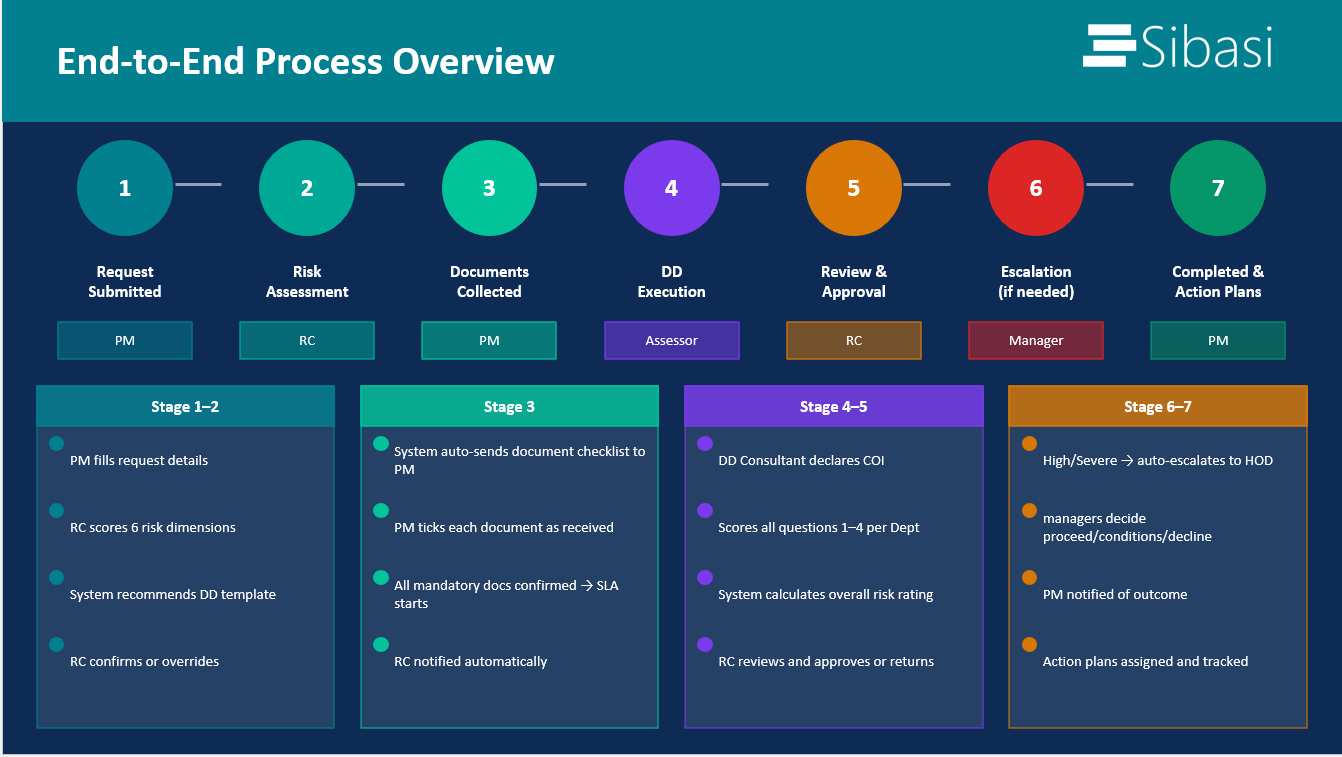
Using Power Automate, we implemented automated:
- Notifications
- Approval routing
- Document checklist generation
- Escalations
- Risk review triggers
- Status updates
As a result, users spend less time following up manually and more time focusing on actual risk assessment activities.
Step 5: Build Risk Scoring into the System
A due diligence system should do more than collect information. It should help decision-makers understand risk.
In this implementation, assessment responses automatically generated risk ratings using the organization's existing methodology. Severe findings triggered additional review and escalation workflows without requiring manual intervention.
This ensured that critical risks could not be overlooked or diluted within larger assessments.
Step 6: Make Compliance Controls Part of the Workflow
One of the most valuable aspects of a digital due diligence system is the ability to enforce compliance requirements automatically.
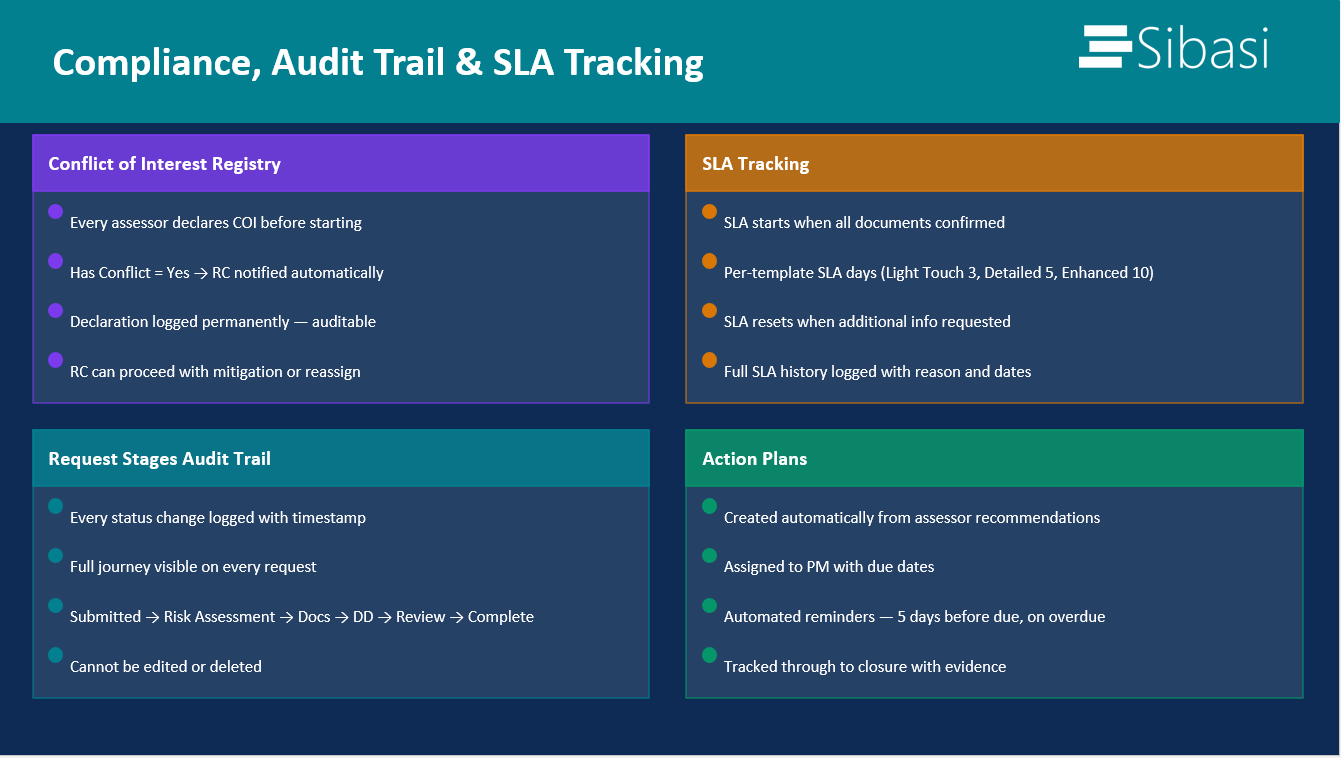
For example, conflict-of-interest declarations were built as mandatory workflow gates. Assessors could not proceed until declarations were completed and recorded.
This transformed compliance controls from policy documents into enforceable system behavior.
Step 7: Prioritize Visibility and Auditability
One of the primary objectives of the project was to improve visibility.
Management needed to know:
- Which assessments were in progress
- Where bottlenecks existed
- Which documents were outstanding
- Who approved what
- When decisions were made
By centralizing the process within Power Platform, every action became traceable, creating a complete audit trail for reporting and compliance purposes.
Why Microsoft Power Platform Was the Right Choice
Organizations evaluating technology options for due diligence often assume they need a custom-built application.
However, Power Platform offers several advantages:
- Rapid development and deployment
- Seamless integration with Microsoft 365
- Enterprise-grade security
- Flexible automation through Power Automate
- Scalable data management through Dataverse
- Lower maintenance compared to traditional custom development
Most importantly, it allows organizations to adapt as their compliance requirements evolve.
Key Takeaway
If your organization currently manages due diligence through spreadsheets, emails, and shared folders, the challenge is not simply digitization - it's creating a structured, auditable, and scalable process.
A well-designed Power Platform solution can centralize information, automate approvals, strengthen governance, and provide decision-makers with real-time visibility into risk.
The technology is important, but success starts with understanding the process, designing for governance, and building automation that supports the way your organization actually works.
The result is not just a better application; it is a better due diligence process.